I'm storing bookmarks in a SemanticScuttle instance on my home server, to which I only have access via VPN. Since I don't want to run my bookmarking instance on a public server, bookmarking interesting things at work involved sending emails to myself and storing them later at home.
So my dream for years was to have a bot in my Jabber roster that I could paste URLs, and it would automatically bookmark them in SemanticScuttle.
Six years ago I even started to fix up the xmpphp library with the goal to some day write a bot with it. But it was never stable enough for me, and lacked MUC support. I abandoned it when that became obvious.
Fast forward to now, and the problem and its accompanying pain was still there. Unfortunately the XMPP client daemon idea never took foot on Linux (although the Pidgin developers had a ticket for it and even had a GSoC project), so I had to look for for XMPP bot implementations.
errbot
The most promising software I found was errbot. It's written in Python, has many commits, is developed actively and has nice plugin writing documentation .
I had looked for a bot which also provides an init.d script, but errbot unfortunately does not provide one . (This isn't a problem, more about that later.)
errbot is still Python and not PHP, and I did not want to write my SemanticScuttle bot in Python. My plan was to write an errbot plugin that executes a program for every message sent to the bot, and sends its output back to the user.
Exec plugin
errbot has a plugin template that you can use to kickstart your own plugin. Simply run errbot --new-plugin and you're done.
For development, errbot has a local test mode that does not connect to any server, which means quick bootup times.
While writing the plugin I learned about os.exec* and os.popen, and that I should rather use the subprocess module for starting programs in python.
By default, errbot plugins are configured through chat commands . I did not like this approach and implemented a way to configure the executable directly in errbot's config file.
In the end, the plugin consists of two files with 88 lines of code and does what I want: Execute the new bookmark-bot.php script in SemanticScuttle's scripts/ directory.
I can bookmark URLs via chat:
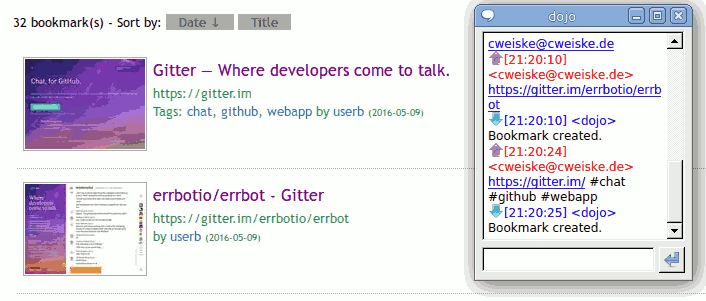
errbot configuration
I'm running errbot on my home server, which I had to update from Debian 7 to Debian 8 because errbot failed with Debian 7's python 2.7.3, Debian's python 2.7.9 works fine though.
After SemanticScuttle was update to the latest git version, errbot itself gets installed via pip:
$ apt-get install python-pip
$ pip install errbot
Then I cloned the exec plugin into /usr/local/src:
$ cd /usr/local/src
$ git clone git://git.cweiske.de/errbot-exec.git
After that, errbot needs to be configured. Since configuration files are stored in /etc/, I created an errbot dir and put the config file in there:
$ mkdir /etc/errbot
$ emacs /etc/errbot/bookmarks.py
The configuration file is as minimal as possible:
import logging
BACKEND = 'XMPP'  # defaults to XMPP
BOT_DATA_DIR = '/var/lib/errbot/bookmarks'

BOT_EXTRA_PLUGIN_DIR = '/usr/local/src/errbot-exec/'
BOT_LOG_FILE = '/var/log/errbot-bookmarks.log'

CORE_PLUGINS = ('ACLs')

# DEBUG, INFO, WARN, ERROR.
BOT_LOG_LEVEL = logging.ERROR
BOT_ASYNC = True

BOT_IDENTITY = {
    # XMPP (Jabber) mode
    'username': 'dojo@cweiske.de/bookmarks',
    'password': 'yesiwilltellyouthis',
}

BOT_ADMINS = ('gbin@localhost','cweiske@cweiske.de')
ACCESS_CONTROLS_DEFAULT = {
    'allowusers': ('gbin@localhost','cweiske@cweiske.de'),
}

EXEC = {
    'command': '/usr/local/src/semanticscuttle/scripts/bookmark-bot.php'
}

# unfortunately required settings
BOT_LOG_SENTRY = False
SENTRY_DSN = ''
SENTRY_LOGLEVEL = BOT_LOG_LEVEL

CHATROOM_PRESENCE = ()
CHATROOM_FN = 'Err'

BOT_PREFIX = '!'
DIVERT_TO_PRIVATE = ()
CHATROOM_RELAY = {}
REVERSE_CHATROOM_RELAY = {}
Data and log directory need of course be created:
$ mkdir /var/lib/errbot/bookmark
$ touch /var/log/errbot-bookmarks.log
errbot shall run with as less privileges as possible, so I created an own user for it:
$ useradd --no-create-home --no-user-group -g nogroup -s /bin/false errbot
$ chown -R errbot /var/lib/errbot/
$ chown errbot /var/log/errbot-bookmarks.log
daemon / autostart
Now I could already start it, but I wanted to run it whenever the server boots up. Debian 8 switched from SysV to systemd, and writing init scripts for it turned out to be easy.
Create /etc/systemd/system/errbot-bookmarks.service with the following contents:
[Unit]
Description=Jabber bot for bookmarking
After=network.target

[Service]
Type=forking
User=errbot
ExecStart=/usr/local/bin/errbot --daemon --config=/etc/errbot/bookmarks.py
ExecStop=/bin/kill -SIGINT $MAINPID
Restart=on-failure

[Install]
WantedBy=multi-user.target
Run man systemd.service to see the full list of allowed directives.
Do not use a symlink! systemd behaves strange if the service script is not a real file.
Now we make it start at boot and start it ourselves:
$ systemctl daemon-reload
$ systemctl enable errbot-bookmarks
$ systemctl start errbot-bookmarks
$ systemctl status errbot-bookmarks
● errbot-bookmarks.service - Jabber bot for bookmarking Loaded: loaded (/etc/systemd/system/errbot-bookmarks.service; enabled) Active: active (running) since Fr 2016-05-13 15:21:10 CEST; 4 days ago Main PID: 30673 (errbot) CGroup: /system.slice/errbot-bookmarks.service └─30673 /usr/bin/python /usr/local/bin/errbot --daemon --config=/etc/errbot/bookmarks.py 2016-05-13 15:21:10,210 INFO errbot.err Config check passed... 2016-05-13 15:21:10,210 INFO errbot.err Selected backend 'XMPP'. 2016-05-13 15:21:10,211 INFO errbot.err Checking for '/var/lib/errbot/bookmarks'... 2016-05-13 15:21:10,211 INFO errbot.err Daemonizing Starting daemon.
Voila, the bot is in action!